I compressed 9 images to 100 KB. Here's what survived.
A 1,609,228-byte food photo shrank to 1749×1749 at JPEG quality 20 to hit 99,927 bytes. Seven photos all landed at quality 20–25. 100 KB is 102,400 bytes.
A 2400×2400 food photograph on this computer is 1,609,228 bytes. Getting it under 100 KB — 102,400 bytes — meant shrinking it to 1749×1749 and encoding JPEG at quality 20. The file that came back was 99,927 bytes. Quality 80 was never a candidate.
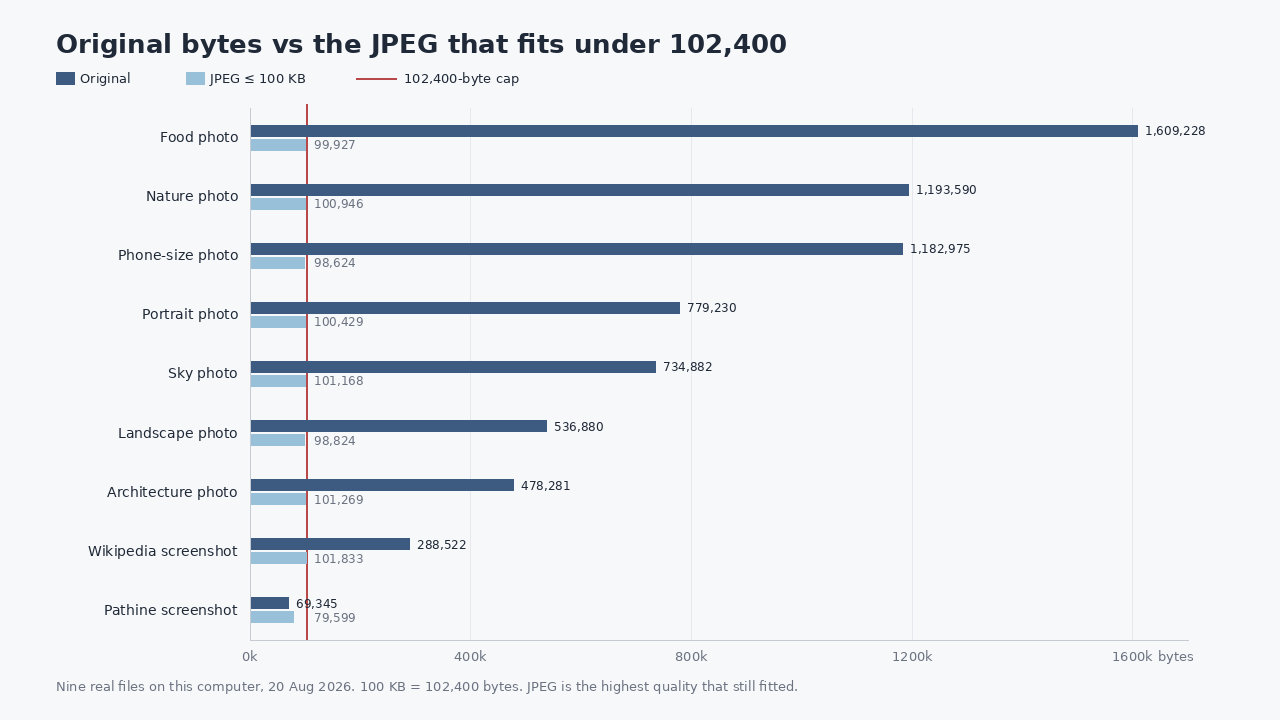
People type “compress image to 100kb” as if 100 KB were a quality setting. It is a budget. The encoder spends that budget on as much quality as will fit, then on pixels if quality alone cannot pay. I measured nine real files today: seven Unsplash photographs and two screenshots I captured (Wikipedia’s Kilobyte article, and Pathine’s own 100 KB tool). The chart at the top is original bytes against the JPEG that actually fitted. The table is the same nine, with the quality number and whether the pixels had to move.
| File | Original | JPEG ≤100 KB | Quality | Pixels after | Had to shrink |
|---|---|---|---|---|---|
| Food photo | 2400×2400 JPEG, 1,609,228 | 99,927 | 20 | 1749×1749 | Yes |
| Nature photo | 2400×1598 JPEG, 1,193,590 | 100,946 | 20 | 1416×942 | Yes |
| Phone-size photo | 4032×2678 JPEG, 1,182,975 | 98,624 | 22 | 2644×1756 | Yes |
| Portrait photo | 2400×3001 JPEG, 779,230 | 100,429 | 23 | 2400×3001 | No |
| Sky photo | 2400×1526 JPEG, 734,882 | 101,168 | 25 | 2400×1526 | No |
| Landscape photo | 2400×1600 JPEG, 536,880 | 98,824 | 22 | 2400×1600 | No |
| Architecture photo | 2400×1600 JPEG, 478,281 | 101,269 | 21 | 2160×1440 | Yes |
| Wikipedia screenshot | 1440×900 PNG, 288,522 | 101,833 | 32 | 1440×900 | No |
| Pathine screenshot | 1440×900 PNG, 69,345 | 79,599 | 95 | 1440×900 | No |
Every photograph landed at JPEG quality 20–25. That is the bargain. Four of the seven had to give up pixels as well: food, nature, the phone-size file, and architecture. Landscape, portrait and sky kept every pixel and still fitted, at those same low qualities. Nature — foliage, the hard case — shrank the most, 2400×1598 down to 1416×942.
100 KB is 102,400 bytes, not a slider
Your operating system means 100 × 1024 when it shows “100 KB”. Some upload forms mean 100,000. I used 102,400, which is the looser of the two; a form that is strict about the decimal reading wants something closer to 97 KB. Either way, it is a cap, not a look. JPEG quality 80 on these same photographs is hundreds of kilobytes. The food photo at quality 80 was 1,353,030 bytes in an earlier encode of this file. You cannot keep that and also keep 100 KB.
The method on this machine: start at the original pixels, find the highest JPEG quality that still fits, and if even quality 20 is over the cap, shrink 10% and try again. Lanczos for the resize. That is why the food photo is 1749×1749 rather than a 2400×2400 smear at quality 4.
WebP bought pixels. Screenshots are a different job.
WebP at the same cap kept the architecture photo at 2400×1600 (quality 32, 101,580 bytes). JPEG had to drop it to 2160×1440. The food photo kept 2160×2160 as WebP against 1749×1749 as JPEG. If the form accepts WebP, that is the extra you are buying. A lot of government portals still do not.
The Wikipedia screenshot, 288,522 bytes of 1440×900 PNG, stayed 1440×900 at JPEG quality 32 (101,833 bytes). WebP reached quality 73 at the same pixels (101,234). Type and flat UI do not need the same discard as leaves. They also do not like it: if the 11-point text goes mushy, you are looking at the wrong trade.
The Pathine screenshot was already 69,345 bytes as PNG. Re-encoding it as JPEG quality 95 produced 79,599 bytes — larger, still under the cap. If the file already fits, keep it. The compressor that “helps” by converting a small PNG to JPEG is not helping.
Drop the file. Read the report.
The Pathine Compress Image to 100 KB tool does this guessing in the browser. The file is not uploaded. It encodes at the best quality that lands under 100 KB, and if quality alone is not enough it reduces the pixel dimensions rather than turning the photo into a smear. The report says which of those happened.
Pathine’s encoder is the browser canvas, not Pillow. Same idea, not bit-identical. If you rerun a file in the tab you will not get these exact byte counts. You should get the same shape: photographs around quality 20–25, foliage more likely to lose pixels, a small PNG left alone.
A few straight answers
Will my photo still look acceptable at 100 KB?
The portrait and the sky kept 2400 pixels on the long side at quality 23 and 25. Those usually look fine at web size. The nature photo at 1416×942 is the one to open and stare at. Fine detail — foliage, textured fabric, noise from a dim room — is what costs bytes. A face against a plain wall is the easy case.
Is 100 KB 100,000 bytes or 102,400?
This test, and Pathine’s tool, treat it as 102,400. If a form is picky about the decimal kilobyte, aim lower.
Does this use Pathine’s compressor, or a fresh encode?
Fresh encode with Pillow on this machine, 20 Aug 2026. Highest JPEG and WebP quality that still fitted. Quality floor 20, then 10% dimension steps. JPEG with optimize=True. WebP method 6. No EXIF copied into the re-encodes. Original byte counts are from the files on disk.
Photographs: Sam Ferrara, Aiony Haust, Anna Pelzer, Lance Anderson, Casey Horner, Vincentiu Solomon, David Marcu, Unsplash License. Screenshots: Wikipedia, Kilobyte, and pathine.com/tools/compress-image-to-100kb, captured 20 Aug 2026.