Does converting a JPG to WebP shrink the file?
On 7 photos, lossy WebP q80 was a median 44.3% of the JPG. Lossless WebP was 414.6%. One toggle, opposite outcomes.
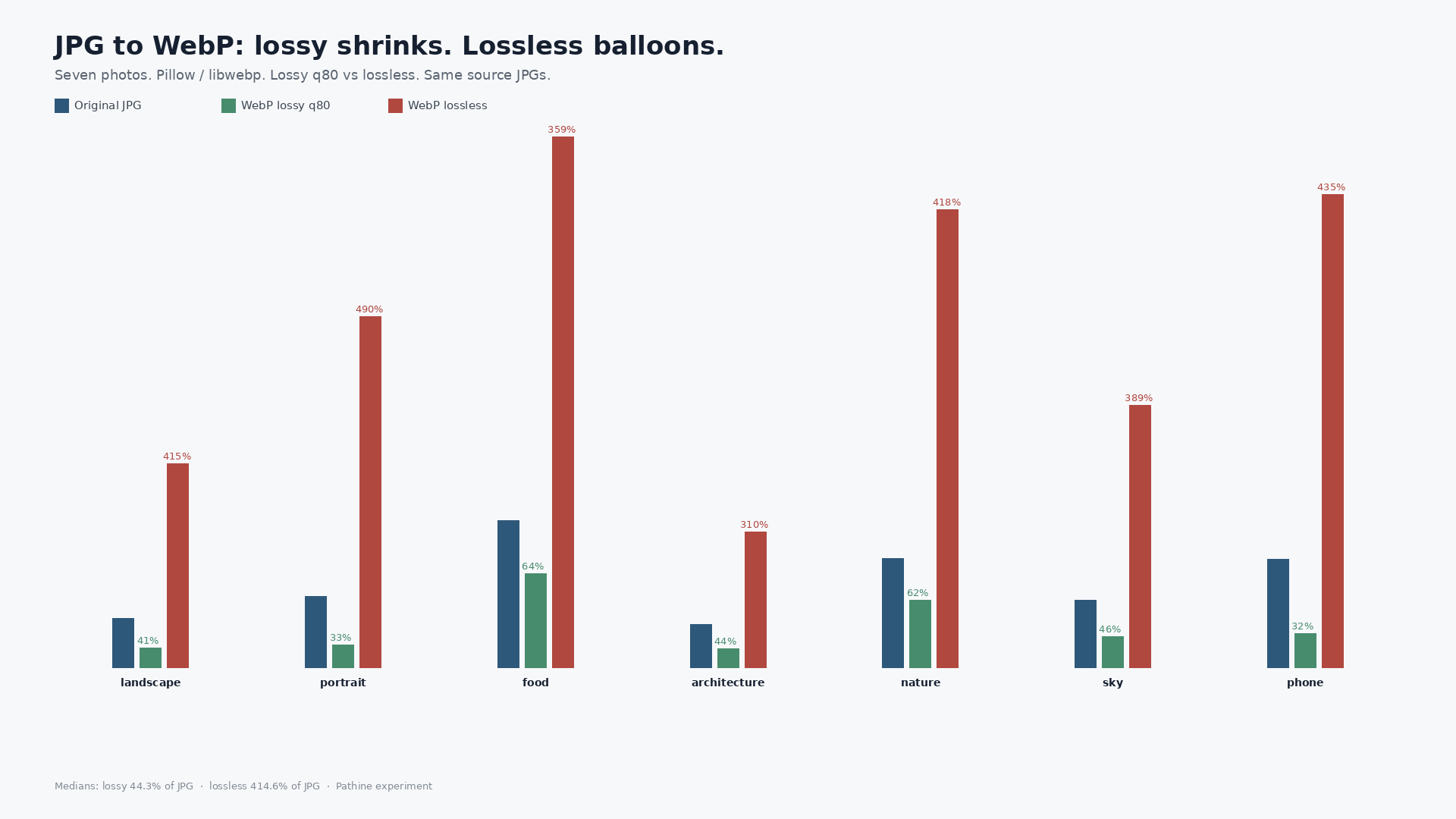
Usually, if you pick lossy. On seven real photos, lossy WebP at quality 80 came back at a median 44.3% of the source JPG. Flip the same files to lossless WebP and the median jumps to 414.6% of the original. Converting JPG to WebP is not one answer. It is two opposite answers behind one toggle.
Google’s public pitch is that lossy WebP is about 25-34% smaller than JPEG. That figure compares equivalent-quality encodes from the same pixels. What people actually do is drag an already-saved vacation JPG into a converter. That is a different job. The converter is re-encoding a file that already threw detail away.
What we measured
Pillow / libwebp on this computer. Lossy: quality=80, method=6. Lossless: lossless=True, method=6. We also re-encoded each source as JPEG quality=80 so the fair comparison is WebP vs a fresh JPEG at the same quality knob, not only vs whatever the camera or Unsplash already baked in. Seven photos. Two PNG UI screenshots. Same originals used in earlier Pathine size posts.
| File | Orig JPG | WebP lossy q80 | % of orig | WebP lossless | % of orig | JPEG q80 | WebP / JPEG80 |
|---|---|---|---|---|---|---|---|
| 01-landscape | 536,880 | 220,196 | 41.0% | 2,226,092 | 414.6% | 458,627 | 48.0% |
| 02-portrait | 779,230 | 255,750 | 32.8% | 3,821,666 | 490.4% | 648,269 | 39.5% |
| 04-food | 1,609,228 | 1,023,556 | 63.6% | 5,777,852 | 359.0% | 1,353,030 | 75.6% |
| 06-architecture | 478,281 | 211,718 | 44.3% | 1,484,966 | 310.5% | 409,128 | 51.7% |
| 08-nature | 1,193,590 | 738,944 | 61.9% | 4,991,968 | 418.2% | 1,018,364 | 72.6% |
| 12-sky | 734,882 | 340,310 | 46.3% | 2,857,982 | 388.9% | 623,666 | 54.6% |
| 20-phone-large | 1,182,975 | 375,000 | 31.7% | 5,151,742 | 435.5% | 989,605 | 37.9% |
Photo medians: lossy WebP q80 = 44.3% of the source JPG. Lossless WebP = 414.6% of the source JPG. Lossy WebP q80 = 51.7% of a fresh JPEG q80.
Not every JPG becomes “about 30% smaller.” The phone original dropped to 31.7% of its JPG. The food photo only got to 63.6%. Portrait lossless hit 490.4% of the JPG: almost five times the file you started with.
The lossless trap
JPEG is already lossy. The encoder threw away high-frequency detail and kept a compact residual. Lossless WebP then tries to store those remaining pixels exactly, including the compression noise JPEG left behind. You are paying to preserve artifacts. That is why the lossless column towers over the originals on every photo row.
Lossy WebP is a second lossy pass. It usually shrinks an already-saved JPG. Against a fresh JPEG q80 from the same pixels, median lossy WebP was still about half the size (51.7%). Google’s 25-34% claim is that fair, same-quality encode story. It is not “flip lossless on an old vacation JPG.”
Screenshots are a different story
UI PNGs are mostly flat color and hard edges. Lossless WebP can still win there.
| File | Orig PNG | WebP lossy q80 | WebP lossless |
|---|---|---|---|
| screenshot-pathine-100kb-tool.png | 69,345 | 19,922 (28.7%) | 26,576 (38.3%) |
| screenshot-wikipedia-kilobyte.png | 288,522 | 114,600 (39.7%) | 120,884 (41.9%) |
On these two screenshots, lossless WebP was 38.3% and 41.9% of the PNG. Lossy went smaller still, at the usual quality cost for text and UI. For photos that started as JPG, lossless was the balloon. For PNG UI, lossless was a real shrink.
What to flip
If the file is a photo JPG and you want it smaller, use lossy WebP and pick a quality. If you leave lossless on, expect a bigger file. If the file is a PNG screenshot, lossless WebP is a sensible default.
Pathine’s JPG to WebP tool does the conversion in the browser. Run your own file through both toggles if you want the exact bytes for that picture. These seven photos are the shape of the answer, not a promise that every JPG lands at 44%.
A few straight answers
Does converting JPG to WebP shrink the file?
Lossy: usually yes. Median here: 44.3% of the source JPG. Lossless: usually no. Median here: 414.6%.
Is WebP always smaller than JPEG?
No. Same-quality lossy WebP beat a fresh JPEG q80 on these photos (median 51.7% of that JPEG). Lossless WebP on a JPG did the opposite.
Why did lossless make my vacation photo huge?
The JPG already discarded detail. Lossless WebP stored what was left, noise included, without a second lossy pass to throw it away again.