Is a photo of your signature a signature file?
No. A page photo is a grey rectangle on the line. A stand-in page was 898,344 bytes; transparent ink PNG was 65,709. The win is missing paper.
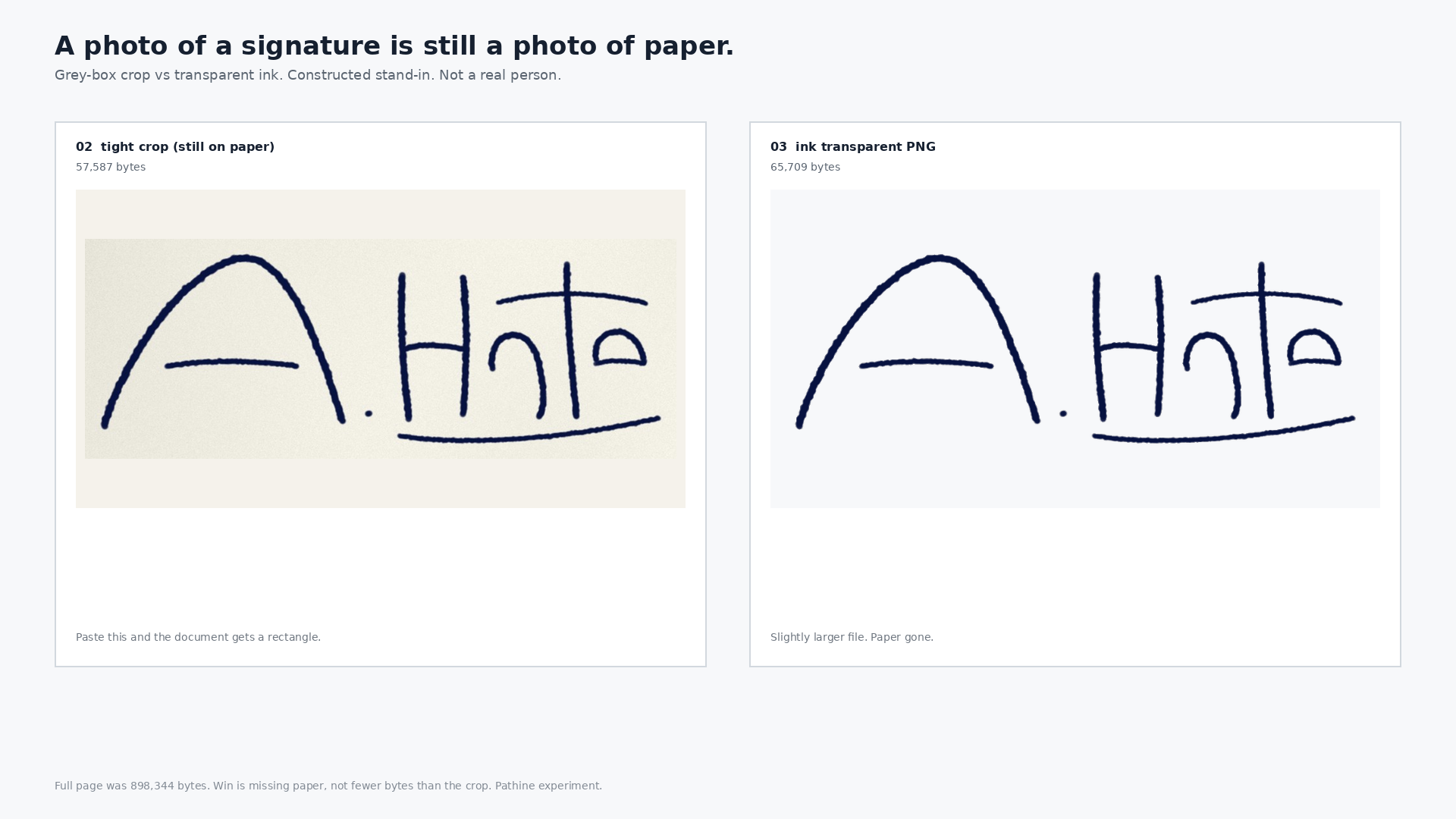
No. A photo of a signed page is a picture of paper. Paste that JPEG onto a Word or PDF signature line and you get a grey or cream rectangle. The signature is the ink. On a constructed stand-in, a 898,344-byte phone-like page photo became a 65,709-byte cropped transparent PNG. The win is the missing paper, not a smaller file.
People photograph a signed sheet, then paste the whole JPEG into a document. The form still sees a photo. A tight crop of the same region still keeps the paper. Extracting the ink to a transparent PNG is a different job from shrinking a JPG.
What we measured
Constructed stand-in name "A. Hale" on cream copy paper. Not a real person. Measured 2026-08-30 on this computer. No real signatures were used.
| File | Pixels | Bytes | Notes |
|---|---|---|---|
| 01-signed-paper.jpg | 2400×3200 | 898,344 | Full constructed phone-like JPEG |
| 02-tight-crop.jpg | 921×343 | 57,587 | Signature region still on paper (grey box) |
| 03-ink-transparent.png | 921×343 | 65,709 | RGBA ink only; 29,496 opaque pixels |
| 04-ink-on-white.png | 921×343 | 58,455 | Same crop, white background |
| 05-document-line.png | 1400×400 | 180,189 | 02 vs 03 on a signature line |
The transparent PNG is about 13.7× smaller than the full page photo (65,709 / 898,344 = 0.073). Against the tight JPEG crop of the same ink still on paper, the PNG is slightly larger: 65,709 vs 57,587 bytes (1.141× the crop). Do not treat "extract signature" as a compression trick. The transparent file can weigh more than a paper crop. What you gain is the paper going away so the document line stays clean.
How the ink was pulled
Local luminance vs local paper mean (BoxBlur radius 35, about 71×71). A pixel counts as ink if it is darker than that local mean by more than 28 luminance units. Not a global cut. Drop 4-connected components smaller than 40 pixels. Crop to the ink bounding box plus a 24-pixel margin. Same idea the live tool describes. This is our measured stand-in on this machine, not a claim we ran Pathine's browser code byte-for-byte.
Grey box vs floating ink
On a signature line, the tight JPEG crop still reads as a grey rectangle. The transparent PNG drops the paper so only the stroke sits on the line. That is the difference people are looking for when they search "how to extract signature from photo." File size is secondary. The paper is the problem.
Pathine's Signature Extractor runs on-device in the browser. The photo never uploads. That matters more for a signature than for a landscape. Export a PNG for documents, or SVG when you need print-scale vectors. This is not a legally binding e-sign. Treat the PNG like a passport scan afterward: keep it somewhere private.
A few straight answers
Is a photo of your signature a signature file?
No. It is a photo of paper that happens to include ink. Documents want the ink without the page.
How do you extract a signature from a JPG?
Separate ink from local paper tone, drop dust, crop to the stroke, keep alpha. On this stand-in: 898,344 bytes of page became 65,709 bytes of transparent ink.
Is the transparent PNG always smaller than a crop?
No. Here the PNG was 1.141× the tight JPEG crop. The win is missing paper, not guaranteed fewer bytes.