Does Cropping Shrink a Photo?
A 16px trim grew 7 of 7 JPEGs at q95 (median 1.5036x). Cropping is a re-encode; the scissors do not set the bytes.
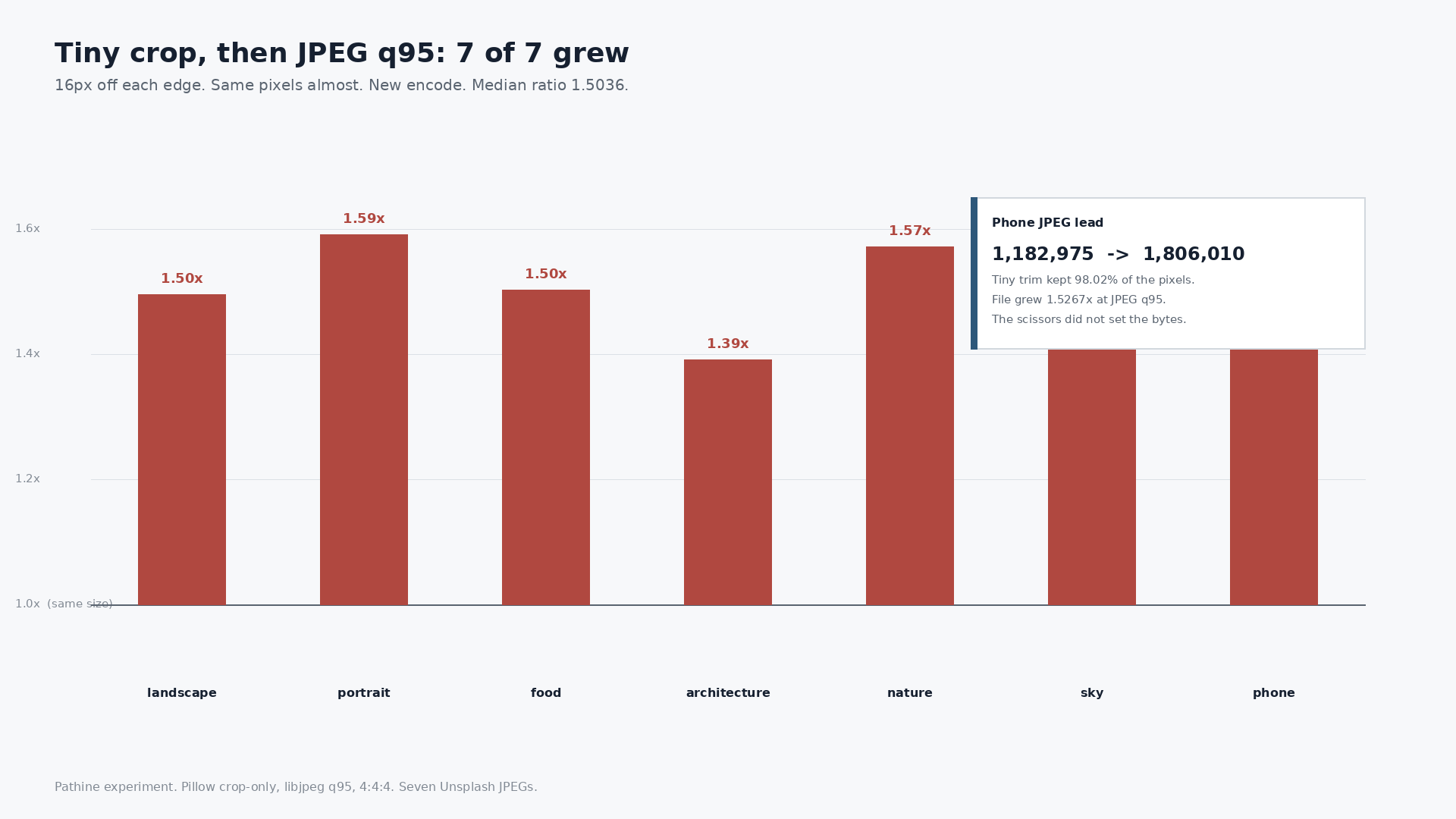
A 16-pixel trim grew 7 of 7 JPEGs. The phone file went from 1,182,975 bytes to 1,806,010 at JPEG quality 95. Cropping is a new save, not a smaller file. The scissors do not set the bytes. The re-encode does.
People treat a crop like a haircut for the file. Cut the edges, expect fewer bytes. What actually happens is: the tool throws away some pixels, then writes a brand-new JPEG (or PNG). The encoder picks the weight. A tiny crop that keeps almost every pixel can still come back heavier than the original.
What we actually did
Pillow crop-only. No resize. Seven Unsplash JPEGs plus two PNG UI screenshots. JPEGs re-encoded with libjpeg. Tiny crop = 16px off each edge. Square = largest centered square. 4:5 = largest centered 4:5 box. EXIF stripped (Pillow JPEG default).
Pathine's Crop Image tool crops on a browser canvas and re-encodes there. Live-tool bytes will not match these Pillow numbers. Same caveat as the resize and JPEG-80 posts. Do not treat the table as a promise of exact tool output.
Tiny crop: 7 of 7 grew
Trim 16px from each edge and you still have most of the picture. On the phone JPEG that is 4000×2646 from 4032×2678: 98.02% of the pixels. Then save.
At JPEG quality 95 with 4:4:4 (no chroma subsampling): every file grew. Median ratio 1.5036.
At JPEG quality 92 with default (canvas-like) subsampling: every file still grew. Median ratio 1.1061.
The scissors removed almost nothing. The new encode set a higher bill.
| File | Original | Tiny q95 | Tiny q92 | Square q92 | Square q80 | 4:5 q92 |
|---|---|---|---|---|---|---|
| 01-landscape 2400×1600 | 536,880 | 802,936 (1.4956) | 587,496 (1.0943) | 391,039 (0.7284) | 292,429 (0.5447) | 1280×1600 308,819 (0.5752) |
| 02-portrait 2400×3001 | 779,230 | 1,240,564 (1.5920) | 874,257 (1.1220) | 777,824 (0.9982) | 381,622 (0.4897) | 2400×3000 889,853 (1.1420) |
| 04-food 2400×2400 | 1,609,228 | 2,419,690 (1.5036) | 1,788,729 (1.1115) | 1,822,279 (1.1324) | 1,353,030 (0.8408) | 1920×2400 1,571,405 (0.9765) |
| 06-architecture 2400×1600 | 478,281 | 665,674 (1.3918) | 514,522 (1.0758) | 409,512 (0.8562) | 319,192 (0.6674) | 1280×1600 344,115 (0.7195) |
| 08-nature 2400×1598 | 1,193,590 | 1,876,131 (1.5718) | 1,316,520 (1.1030) | 1,081,294 (0.9059) | 689,506 (0.5777) | 1278×1598 927,637 (0.7772) |
| 12-sky 2400×1526 | 734,882 | 1,058,169 (1.4399) | 812,856 (1.1061) | 619,369 (0.8428) | 329,085 (0.4478) | 1221×1526 496,491 (0.6756) |
| 20-phone 4032×2678 | 1,182,975 | 1,806,010 (1.5267) | 1,324,072 (1.1193) | 1,044,783 (0.8832) | 580,965 (0.4911) | 2142×2678 842,887 (0.7125) |
Medians across the seven JPEGs: tiny q95 1.5036; tiny q92 1.1061; square q92 0.8832; square q80 0.5447; 4:5 q92 0.7195.
Square and 4:5: cutting more can shrink. Quality still rules.
Largest centered square at q92: median 0.8832 of the original. Same square at q80: median 0.5447. Centered 4:5 at q92: median 0.7195.
The phone file again: 4032×2678, 1,182,975 bytes. Square 2678×2678 (66.42% of the pixels): q92 = 1,044,783 (0.8832); q80 = 580,965 (0.4911). 4:5 2142×2678 (53.12% of the pixels): q92 = 842,887 (0.7125).
Fewer pixels help. A soft quality setting helps more. Neither is "cropping made it smaller" by magic. Both are "we threw away pixels, then we picked an encode."
Proof the save sets the size
04-food-unsplash.jpg is already square: 2400×2400, 1,609,228 bytes. A "square crop" keeps the same pixels. Save at q92 and it grows to 1,822,279 (1.1324). No edges removed. New JPEG. Bigger file.
Portrait 02 tells the same story from the other side. A 4:5 crop is 2400×3000 from 2400×3001: 99.97% of the pixels. At q92 it grew to 889,853 from 779,230 (1.1420). Almost every pixel kept. Bytes still up.
PNG screenshots, kept as PNG
Two UI screenshots, centered square, saved as PNG (not JPEG).
| File | Original | Square PNG | Ratio | Pixels kept |
|---|---|---|---|---|
| pathine UI | 69,345 | 48,795 | 0.7035 | 62.50% |
| wikipedia UI | 288,522 | 252,773 | 0.8761 | 62.50% |
Here the crop did cut weight, because PNG is storing structure and the square threw away real canvas. That is not the JPEG story above.
Crop for the frame. Encode for the bytes.
If you need a Square, 4:5, 3:2, 16:9, or 9:16 frame, crop for that. If you need a smaller file, watch the re-encode: quality, format, and how much of the grid you actually kept. A 16px trim is not a compression trick.
Pathine's Crop Image tool does those aspect presets in the browser. The image is never uploaded. Run your own file if you want the canvas bytes for that picture. These seven JPEGs are the shape of the answer, not a promise that every crop lands at 1.5×.
A few straight answers
Does cropping reduce file size?
Not by itself. A tiny trim grew 7 of 7 JPEGs here (median 1.5036× at q95, 1.1061× at q92). Bigger aspect crops shrank when quality stayed reasonable and enough pixels left. The re-encode sets the bytes.
Why did cropping increase my file size?
Because crop tools save a new file. If the original was already a tight JPEG and the new save uses a high quality (or drops subsampling), the new file can weigh more even when you removed edges. Food at identical 2400×2400 pixels grew from 1,609,228 to 1,822,279 at q92.
Will Pathine give me these exact bytes?
No. We used Pillow / libjpeg. Pathine uses canvas. Same shape, not bit-identical. Run your file in the tab if you need the number your browser will actually produce.