If you draw a black box on a PDF, is the text gone?
No. A black rectangle sits on top of the text. pdftotext still returns Account 4417-2291. Covering is not removing.
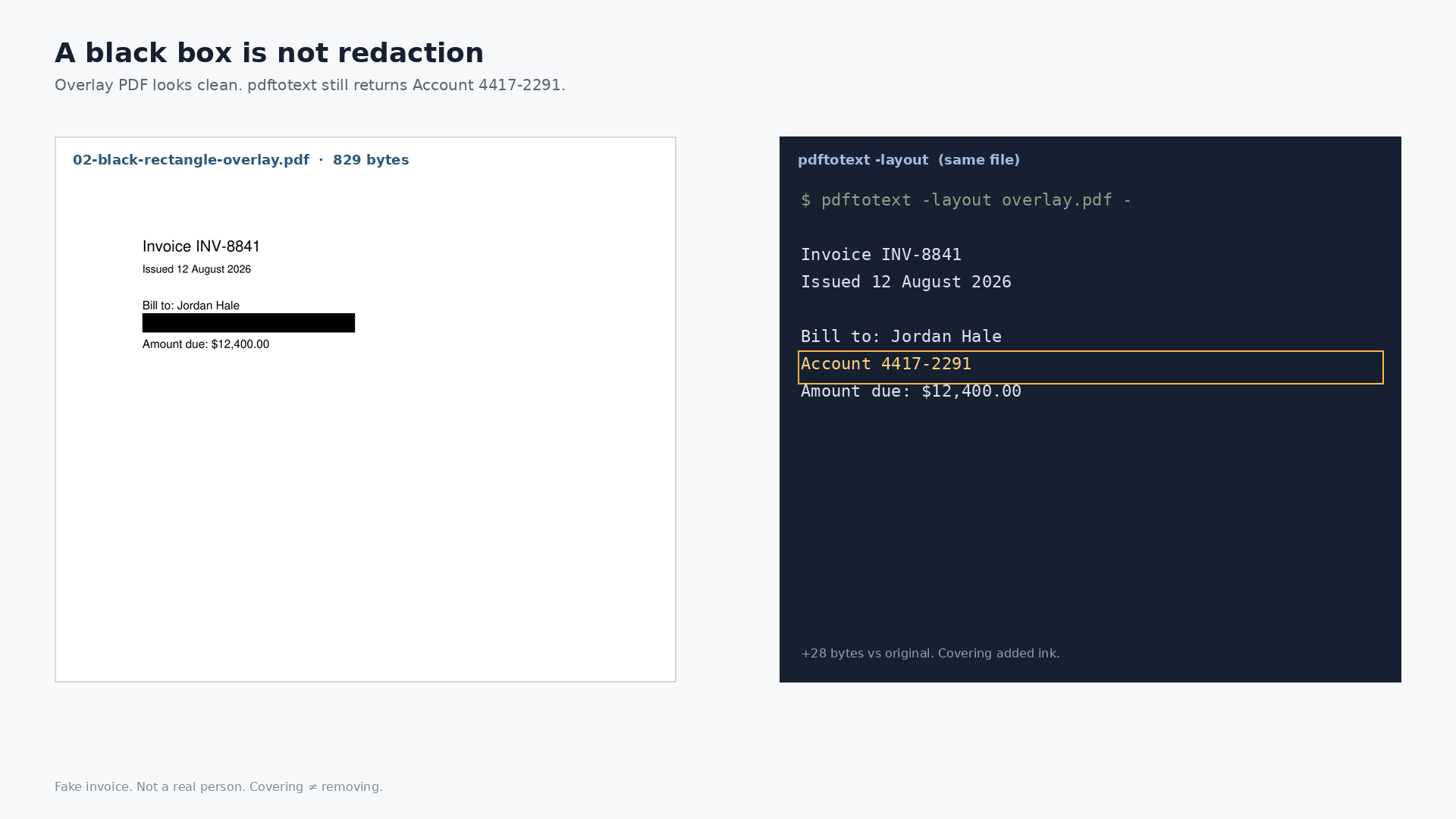
No. A black rectangle on a PDF is another drawing instruction. It sits on top of the text. It does not delete the text. On a one-page fake invoice, painting a black bar over the account line made the file 28 bytes larger and left Account 4417-2291 fully extractable with pdftotext.
Covering is not removing. That is the whole post.
What a black box actually is
A PDF is a stack of instructions: draw this glyph here, fill this rectangle there. When you black out a line in Preview, Acrobat, or a markup tool, you usually add a filled rectangle on top of the page. The text instruction underneath stays. The viewer paints black last, so your eyes stop seeing the digits. A text extractor does not look with eyes. It reads the content stream.
Court filings have leaked this way for years: a cosmetic black box over a name, then the same name still selectable or searchable in the filed PDF. One nod is enough. The mechanism is the same on a fake invoice.
What we measured
One page. Invented. Not a real person. Invoice INV-8841, bill to Jordan Hale, account 4417-2291, amount due $12,400.00. Three files on disk, weighed and extracted on 2026-08-27.
| File | Bytes | pdftotext has Account 4417-2291? | String in file bytes? |
|---|---|---|---|
| 01-original-invoice.pdf | 801 | yes | yes |
| 02-black-rectangle-overlay.pdf | 829 (+28) | yes | yes |
| 03-text-removed-black-bar.pdf | 780 | no | no |
The overlay is the black bar you think of as redaction. It is 28 bytes heavier than the original, not lighter. You added ink. You did not remove the account line.
pdftotext -layout on the overlay still returns the full invoice:
Invoice INV-8841
Issued 12 August 2026

Bill to: Jordan Hale
Account 4417-2291
Amount due: $12,400.00
Visually, the account line is a black bar. In the file, the string 4417-2291 is still there. Select-all, copy, search, or a one-line extract all see it.
What actually makes it gone
File 03 removed the text operator for that line and left a black bar as paint. Size: 780 bytes. pdftotext no longer returns the account number. A byte search for 4417-2291 misses. That is the difference between a cover and a removal.
Pathine’s PDF Redactor does not ship a 780-byte file. It rebuilds marked pages as flat images. Different size. More thorough for a page that also had vectors and fonts you do not want to keep. The 780-byte file is only a content-stream analogue so you can see the mechanism on a tiny invoice. Drop the overlay PDF on the tool anyway. The “still giving away” panel lists Account 4417-2291.
A few straight answers
Does blacking out a PDF hide the text?
From a reader’s eyes, often yes. From the file, no. The text is still an instruction underneath the rectangle.
Why can I still copy text from a black box PDF?
Because copy reads the text operators, not the pixels you see. The black bar is paint on top.
Is a black box the same as redaction?
No. Redaction removes or destroys the underlying content. A black box is usually just another drawing.
How do I check a file I already marked up?
Run pdftotext, try select-all and paste, or search the PDF for the secret. If it comes back, the box was a cover. The Pathine redactor’s leak panel is built for that check.