Does 300 DPI make a bigger file than 72 DPI?
Same 1200×1800 JPEG at 72 DPI and 300 DPI: both 103,977 bytes. A 4×6 at 300 DPI is 17× the pixels of 72 DPI. DPI is a print label, not a file-size knob.
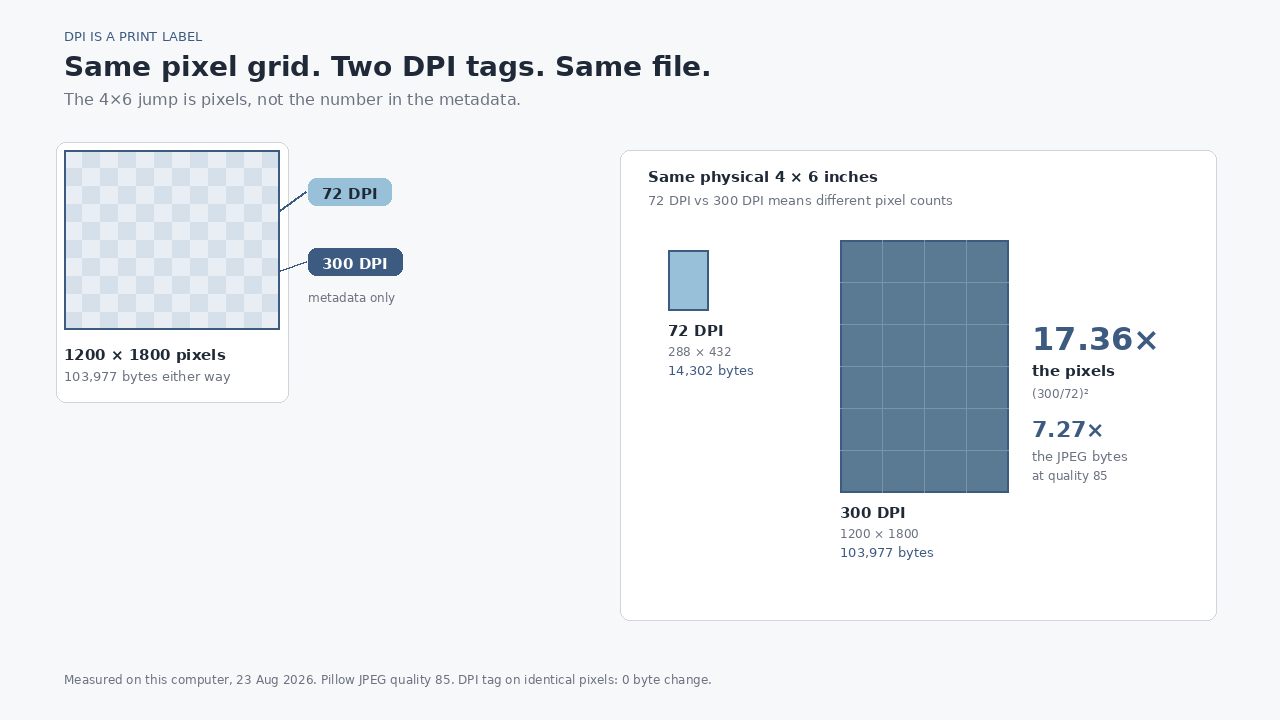
We saved the same 1200×1800 picture as JPEG quality 85 twice: once tagged 72 DPI, once tagged 300 DPI. Both files were 103,977 bytes. Changing the print label did not change a single byte. Making a true 4×6-inch print at 300 DPI instead of 72 DPI meant 17.36× the pixels, and the JPEG went from 14,302 bytes to 103,977.
The search is “does 300 DPI increase file size.” The answer people want is yes, because 300 sounds denser than 72. The answer the file gives is: only if you also add pixels. DPI is a print instruction. Pixel count is the size.
What we actually did
One 1200×1800 RGB test card, drawn on this computer today: a cool gradient, four labeled fields, a small spec table. It looks like a document, not a camera original. We encoded it with Pillow (libjpeg) at JPEG quality 85, optimize on, three ways:
- Same pixels,
dpi=(72, 72). - Same pixels,
dpi=(300, 300). - The same picture at the pixel count a 4×6-inch print actually needs at 72 DPI: 288×432. A 4×6 at 300 DPI is 1200×1800 — the original grid.
We then opened the JPEG headers. The JFIF density really was 72 versus 300. This was not a no-op save that left the old tag in place.
| File | Pixels | DPI tag | Bytes |
|---|---|---|---|
| Same picture, 72 DPI tag | 1200×1800 | 72 | 103,977 |
| Same picture, 300 DPI tag | 1200×1800 | 300 | 103,977 |
| 4×6 in at 72 DPI | 288×432 | 72 | 14,302 |
| 4×6 in at 300 DPI | 1200×1800 | 300 | 103,977 |
Identical pixels, two tags: 0 bytes of difference. (300/72)² = 17.3611× the pixels. The JPEGs were 7.27× apart (103,977 ÷ 14,302). File size did not track pixels one-for-one, because the 288×432 downsample is smoother and quality 85 packs it tighter. The direction is still the pixels. The tag did nothing.
DPI does not live in the picture
A JPEG is a grid of samples plus a little header. The header can say “please print these samples at 300 dots per inch.” A browser ignores that. A phone ignores that. The screen paints pixels. 1200×1800 at 72 DPI and 1200×1800 at 300 DPI are the same picture on every display we care about for a web upload.
A print shop does not ignore it, or rather: they care whether you have enough pixels for the paper. 4 inches × 300 = 1200. 6 inches × 300 = 1800. That is why 1200×1800 is “a 4×6 at 300 DPI.” Write 72 in the header instead and the same file wants to print at 16.7 × 25.0 inches. The photo did not get softer. The paper got bigger. Photoshop’s Image Size dialog will resample if you tell it to, and that is the step that actually creates or destroys pixels. Changing the number with “Resample” unchecked is the tag-only case we weighed: 103,977 either way.
If the cap is bytes, change the pixels
Forms that reject a file over 1 MB, 500 KB, 100 KB are counting bytes. They are not reading the DPI tag. Setting 72 DPI on a 4000-pixel phone photo will not get you under the cap. Shrinking the grid will.
The Pathine Image Resizer changes width and height in the browser. The file is never uploaded. If the upload is a 4×6 print at 300 DPI, 1200×1800 is the size. If it is a web image, 1600 pixels on the long side is usually more than enough. After the pixels are honest, compress if you still need fewer bytes — that is a different tool, and a different injury.
Do not “change DPI” and expect a smaller file. That is a print label. The resizer is the knob that matches an upload cap.
What this does not prove
We measured JPEGs we encoded. Pillow wrote a JFIF density and no EXIF. A camera JPEG can carry a thumbnail, GPS, maker notes, a whole second, smaller picture inside the file. Those bytes are real, and they have nothing to do with 72 versus 300. If your 300 DPI export is a few kilobytes heavier than your 72 DPI export of the same pixels, look at EXIF and the thumbnail before you blame the tag. In this run, with none of that attached, the two tagged files were the same 103,977 bytes.
It also does not prove that a 4×6 at 300 DPI will always be 7.27× the 72 DPI JPEG. That ratio is this test card at quality 85. A noisy photograph holds more leftover detail at the large size, so the byte ratio can climb toward the 17× pixel ratio. The tag-only comparison should still sit near zero.
A few straight answers
Does 300 DPI make a bigger file than 72 DPI?
Not if the pixels stay put. Ours did not move, and the files were both 103,977 bytes. Yes if “300 DPI” means you resampled up so a given print size has more dots. That is a bigger picture that happens to be labeled 300.
Why do people still export at 72 DPI for the web?
Habit from old Macintosh monitors that were about 72 pixels per inch. Browsers do not use the tag. 72 versus 96 versus 300 is a print conversation.
Will Pathine’s resizer write a DPI tag?
It redraws the pixel grid in the canvas. That is the part that changes bytes. If you need a 4×6 at 300 DPI, set 1200×1800. If you need to clear a byte cap, set fewer pixels than you have, then look at the file size.