I compressed 20 real files at JPEG quality 80. Here's what actually shrank.
20 real files, JPEG quality 80, bytes measured from disk. Median save 15.5%. One small web JPEG got bigger. PNG screenshots were the outliers.
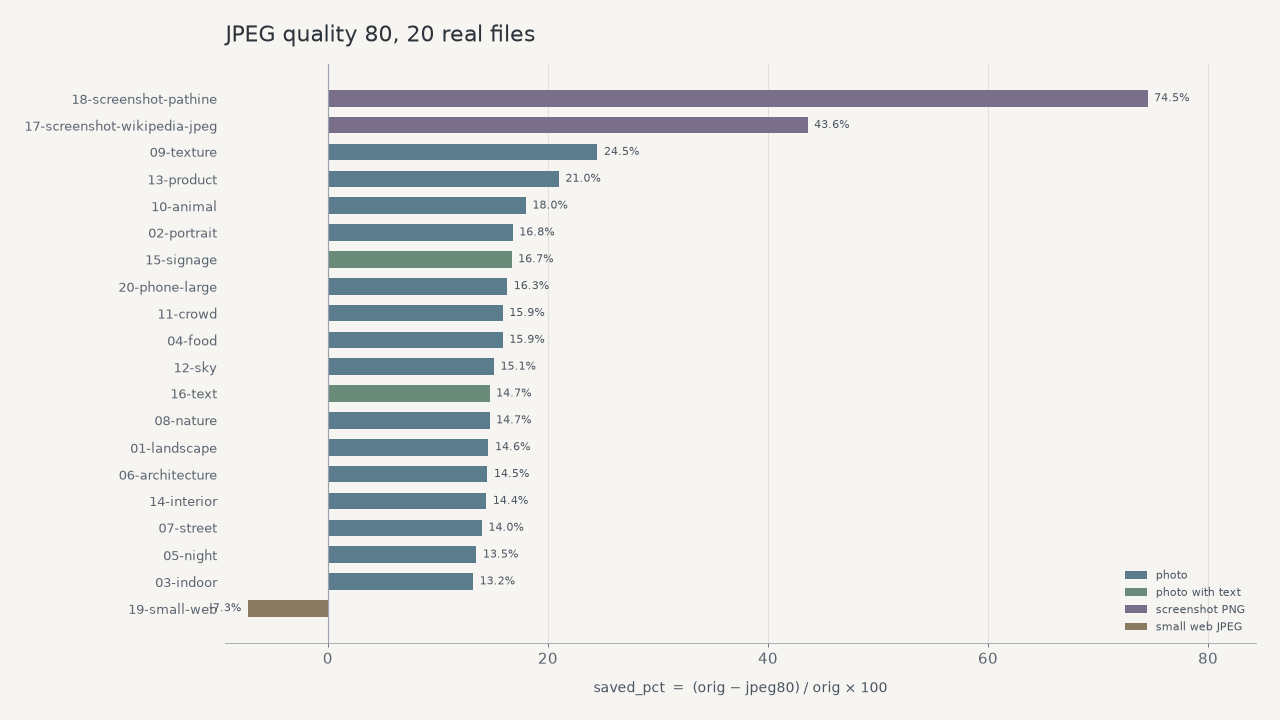
JPEG quality 80 is the number everyone types. We ran it on 20 real files and measured the bytes. The median file got 15.5% smaller. One got bigger. The two PNG screenshots are why the mean looks better than the photos.
This is a file-size test, not a beauty contest. We did not score sharpness. We re-encoded each file at JPEG quality 80, kept the pixel dimensions, and weighed the result. If you want to know whether you can see the difference, drop your own photo on the Pathine Image Compressor and look at the two versions. That part is yours. The table is ours.
What we actually did
Twenty files on disk. Fourteen Unsplash photographs, two photographs with readable signage, two real UI screenshots saved as PNG, one already-small 800×600 web JPEG, and one large phone-like JPEG (4032 pixels on the long side).
Each one was re-encoded as JPEG quality 80 with Pillow, which uses libjpeg. Optimize on, progressive off, no resize. Pathine's compressor uses the browser canvas encoder at the same quality setting. Same idea, not bit-identical. If you rerun a file in the tab you will not get our exact byte counts. You should get the same shape.
The number, then the split
Median savings: 15.5%. Mean: 19.2%. Mean is the one that lies here. It is being pulled up by two PNG screenshots. Take those out and the median on the remaining 18 files is 14.9%.
The photographs, including the two with text in the frame, clustered between 13.2% and 24.5%. Most of them sat in a boring band around 14–17%. That is what already-compressed JPEGs do when you ask quality 80 to go again. Unsplash is not a camera roll. These files had already been through a JPEG encoder before we touched them.
The screenshots were a different job. A 1440×900 PNG of Wikipedia's JPEG article went from 359.4 KB to 202.8 KB (43.6%). A PNG of pathine.com went from 282.1 KB to 71.9 KB (74.5%). That is mostly format conversion, PNG to JPEG, not a photo getting a haircut. If you compress a screenshot of a UI, you are allowed to see a big cut. If you compress a JPEG that was already a JPEG, you should expect something closer to 15% on a set like this.
The file that got worse
File 19 was an 800×600 web JPEG, 70.1 KB. Quality 80 produced 75.2 KB. That is 7.3% larger. Re-encoding a small, already-crushed JPEG can add bytes. Pathine's compressor already warns when a PNG comes back bigger and keeps the original. The same instinct applies here: if the output is heavier, keep the input.
This is the same trap as exporting a "small" JPG for Instagram and then letting Instagram compress it again. There is not much left to squeeze, and the second pass can cost you.
The 20 files
Sorted by how much they shrank. Sizes are kibibytes (bytes / 1024), one decimal. Percentages are from the raw byte counts.
| File | Pixels | Original | JPEG 80 | Saved |
|---|---|---|---|---|
| Pathine screenshot (PNG) | 1440×900 | 282.1 KB | 71.9 KB | 74.5% |
| Wikipedia screenshot (PNG) | 1440×900 | 359.4 KB | 202.8 KB | 43.6% |
| Texture | 2400×1600 | 674.3 KB | 509.2 KB | 24.5% |
| Product | 2400×1600 | 287.3 KB | 227.0 KB | 21.0% |
| Cat | 2400×1651 | 410.4 KB | 336.4 KB | 18.0% |
| Portrait | 2400×3001 | 761.0 KB | 633.1 KB | 16.8% |
| Signage | 2400×3002 | 1141.6 KB | 950.9 KB | 16.7% |
| Large phone-like JPEG | 4032×2678 | 1155.2 KB | 966.4 KB | 16.3% |
| Food | 2400×2400 | 1571.5 KB | 1321.3 KB | 15.9% |
| Crowd | 2400×1600 | 399.1 KB | 335.6 KB | 15.9% |
| Sky | 2400×1526 | 717.7 KB | 609.0 KB | 15.1% |
| Nature | 2400×1598 | 1165.6 KB | 994.5 KB | 14.7% |
| Billboards | 2400×1600 | 692.4 KB | 590.7 KB | 14.7% |
| Landscape | 2400×1600 | 524.3 KB | 447.9 KB | 14.6% |
| Architecture | 2400×1600 | 467.1 KB | 399.5 KB | 14.5% |
| Interior | 2400×1266 | 631.5 KB | 540.4 KB | 14.4% |
| Street | 2400×1476 | 1155.4 KB | 993.8 KB | 14.0% |
| Night | 2400×1600 | 708.5 KB | 612.7 KB | 13.5% |
| Indoor | 2400×1645 | 879.8 KB | 764.0 KB | 13.2% |
| Small web JPEG | 800×600 | 70.1 KB | 75.2 KB | -7.3% |
What this does not prove
It does not prove that quality 80 looks fine. We did not run a blind test. It does not prove you will save 15% on a photo straight off an iPhone. Those originals are often HEIC or a fatter JPEG than Unsplash serves. A barely-compressed camera file has more air in it. A PNG screenshot has a different kind of air. A 70 KB web JPEG has almost none.
It also does not match the "60–80% smaller" line you see on a lot of compressor pages, including ours, when the starting file is already a decent JPEG. That range showed up here only on the PNGs. If your file is a phone original or a screenshot, you may see it. If your file is a photo you already downloaded from the web, you probably will not.
Try it on the file you actually have
The table is 20 files we picked. Your file is the one that matters. Open the Image Compressor, leave quality at 80% for a photo (around 90% if it is a screenshot with type), and read the two sizes. The pixels do not change. If you also need fewer pixels, that is the Image Resizer, then compress.
Both tools run in the browser. The image is never uploaded.
A few straight answers
Is 15% worth doing?
On a single photo, maybe not. On a folder of twenty, yes. On a PNG screenshot, obviously. On a 70 KB JPEG, no — we made that one larger.
Why didn't the 4032-pixel "phone" photo collapse?
It was already a JPEG, 1.1 MB at 4032×2678. Quality 80 took it to 966.4 KB, 16.3% off. Lots of pixels is not the same as lots of leftover quality. The encoder had already done most of the work.
Will Pathine give me these exact bytes?
No. We used libjpeg. Pathine uses canvas. Run your file in the tab if you need the number your browser will actually produce.
Credits
Photographs via Unsplash. Screenshots of public pages, taken for this test.
- Landscape: Sam Ferrara, https://unsplash.com/photos/1527pjeb6jg. Unsplash License.
- Portrait: Aiony Haust, https://unsplash.com/photos/3TLl_97HNJo. Unsplash License.
- Indoor: Daan Evers, https://unsplash.com/photos/tKN1WXrzQ3s. Unsplash License.
- Food: Anna Pelzer, https://unsplash.com/photos/IGfIGP5ONV0. Unsplash License.
- Night: Ben O'Bro, https://unsplash.com/photos/wpU4veNGnHg. Unsplash License.
- Architecture: Lance Anderson, https://unsplash.com/photos/QdAAasrZhdk. Unsplash License.
- Street: Pedro Lastra, https://unsplash.com/photos/Nyvq2juw4_o. Unsplash License.
- Nature: Casey Horner, https://unsplash.com/photos/4rDCa5hBlCs. Unsplash License.
- Texture: Jr Korpa, https://unsplash.com/photos/9XngoIpxcEo. Unsplash License.
- Cat: Manja Vitolic, https://unsplash.com/photos/gKXKBY-C-Dk. Unsplash License.
- Crowd: Headway, https://unsplash.com/photos/F2KRf_QfCqw. Unsplash License.
- Sky: Vincentiu Solomon, https://unsplash.com/photos/ln5drpv_ImI. Unsplash License.
- Product: C D-X, https://unsplash.com/photos/PDX_a_82obo. Unsplash License.
- Interior: Spacejoy, https://unsplash.com/photos/9M66C_w_ToM. Unsplash License.
- Signage: Jezael Melgoza, https://unsplash.com/photos/nYugmV-SY6s. Unsplash License.
- Billboards: Luca Bravo, https://unsplash.com/photos/TaCk3NspYe0. Unsplash License.
- Wikipedia screenshot (PNG): screenshot of https://en.wikipedia.org/wiki/JPEG.
- Pathine screenshot (PNG): screenshot of https://pathine.com/.
- Small web JPEG: André Spieker, https://unsplash.com/photos/8wTPqxlnKM4. Unsplash License.
- Large phone-like JPEG: David Marcu, https://unsplash.com/photos/78A265wPiO4. Unsplash License.