US Passport Photo Size: 2x2 Inches, 54 KB–10 MB Online (Not 600x600)
US passport photo: 2x2 in (51x51 mm), head 1–1 3/8 in. Online renewal wants a 54 KB–10 MB file with no pixel size. 600x600–1200x1200 px is the visa spec.
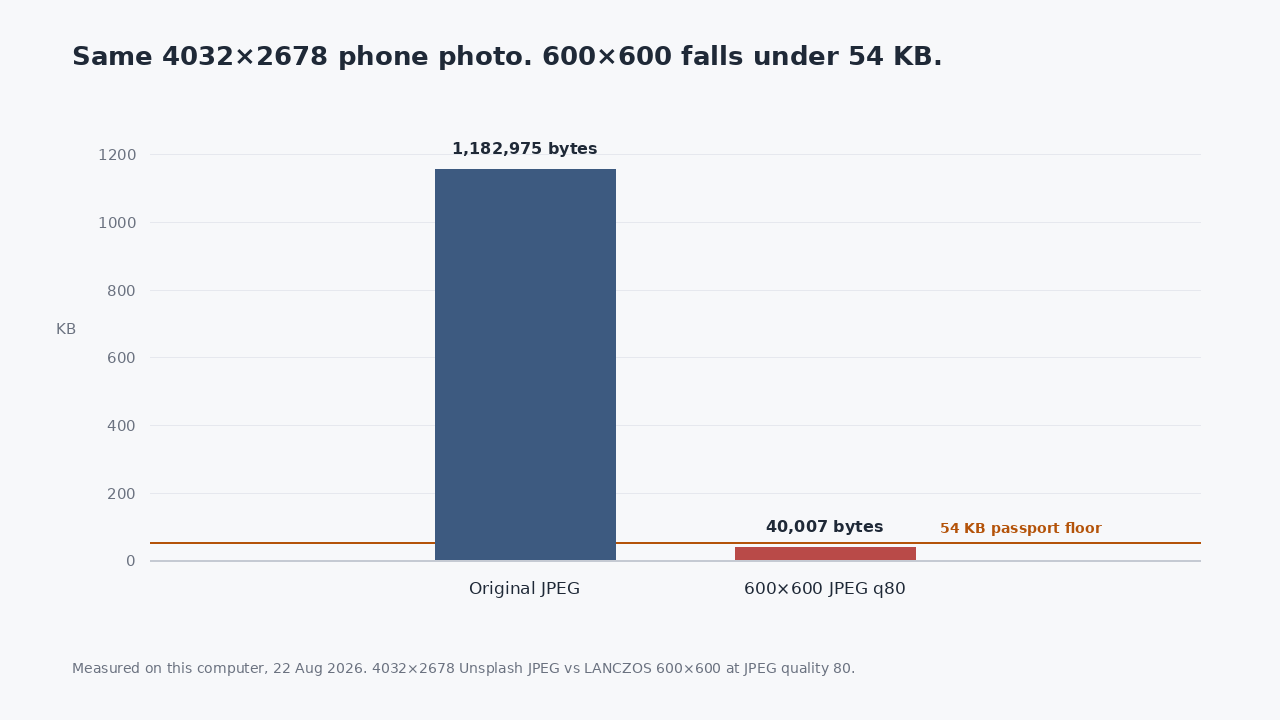
I took a 4032×2678 phone photograph (1,182,975 bytes) and resized it to 600×600 because that is what “US passport photo size” pages say to do. The 600×600 JPEG was 40,007 bytes. Online US passport renewal rejects files under 54 KB. The original already passed.
The 600×600 number is real. It is just not the passport-renewal number. It is the digital visa photo spec: a square JPEG between 600 and 1200 pixels, at or under 240 KB. Shrinking a renewal photo to match it is how you fail the 54 KB floor.
I re-encoded four real files on this computer today (three Unsplash photographs and a Wikipedia screenshot). Each one was measured as it came, then as a 600×600 JPEG at quality 80, a 1200×1200 JPEG at quality 80, and a 200×200 JPEG at quality 40. The chart at the top is the phone photo. The table is the rule, not a guessed template.
| File | Pixels | Bytes | Online passport (54 KB–10 MB) | Digital visa (600–1200 px JPEG ≤240 KB) |
|---|---|---|---|---|
| Phone JPEG, as shot | 4032×2678 | 1,182,975 | PASS | FAIL |
| Same photo → 600×600 JPEG q80 | 600×600 | 40,007 | FAIL under 54 KB | PASS |
| Same photo, center-crop 600×600 | 600×600 | 41,350 | FAIL under 54 KB | PASS |
| Same photo → 1200×1200 JPEG q80 | 1200×1200 | 144,506 | PASS | PASS |
| Same photo saved as PNG | 4032×2678 | 7,639,293 | PASS | FAIL |
| Landscape JPEG, as shot | 2400×1600 | 536,880 | PASS | FAIL |
| Landscape → 600×600 JPEG q80 | 600×600 | 44,354 | FAIL under 54 KB | PASS |
Every original photograph in this set already sat inside the online-renewal window. Every 600×600 quality-80 JPEG of a photograph fell under 54 KB. Cropping instead of stretching did not save it: 41,350 bytes is still under the floor.
Three different jobs, three different files
Printed photos submitted on paper are 2×2 inches (51×51 mm), with the head 1 to 1 3/8 inches (25–35 mm) from chin to top. That is a print size. It is not a pixel size, and it is not what the online renewal upload asks for.
Online US passport renewal, as published by the State Department and checked here on 9 Aug 2026, asks for a color file between 54 KB and 10 MB, taken in the last six months. It does not specify pixel dimensions. The application crops and repositions the photo itself. It also asks for the original, unedited file. Re-encoding a photo that already passes is doing the thing they told you not to do.
A US visa digital image is the square: 600×600 to 1200×1200, JPEG, 240 KB or less. That is a different form. Mixing the two is how a 1.1 MB phone JPEG that would have uploaded becomes a 40,007-byte thumbnail the renewal site can reject for being too small.
What actually fails the file check
Under 54 KB: the 600×600 “passport size” JPEGs in this set, and anything you have saved as a tiny email thumbnail. 200×200 at quality 40 was 2,433 bytes on the phone photo.
Over 10 MB: none of these files. The PNG of the same 4032×2678 pixels was 7,639,293 bytes, still inside. A 48-megapixel phone export saved as PNG, or a studio RAW converted without shrinking, is the usual way over the ceiling. The file rules do not care that it is a nice picture.
Wrong format for a visa upload is its own problem. The Wikipedia screenshot PNG (288,522 bytes, 1440×900) passes the passport byte window and fails every visa pixel rule: not JPEG, not square, not 600–1200.
Check the file. Do not invent a 600-pixel square unless you are doing a visa.
The Pathine US passport photo tool measures the file on your device against the renewal rules. If the photo already meets them, it hands the same bytes back. It does not crop a 2×2 square, because the application does that, and it does not re-encode a file that already fits. A photo that is under 54 KB or over 10 MB is the case where anything changes.
These measurements are about the file, not the face. Plain background, no glasses, mouth closed, recent: the State Department still requires those, and software cannot tick them for you. This page will not pretend it can.
If the form you are filling in is a visa, that is a different page: US visa photo, which is the 600×600 JPEG under 240 KB. Use that when the visa spec is the spec. Do not use it to “fix” a passport renewal photo that was already fine.
A few straight answers
Do I need to crop to 2×2 inches first?
Not for online renewal. You reposition inside the application. The 2×2 figure is for a printed photo on paper.
Why did a 600×600 export fail?
Because 40,007 bytes is under 54 KB. The visa spec wants that square. The renewal upload wants a file in a byte window, and a typical phone JPEG is already in it.
Will converting HEIC to JPEG break the “unedited” rule?
Windows often cannot open HEIC at all. A conversion is a new file. If the JPEG you get is still between 54 KB and 10 MB, it meets the file limits; whether the application treats it as original is their call, not this table’s.
Are these photographs I should submit?
No. They are Unsplash files and a screenshot, used as payloads to measure bytes and pixels. Submit a photo of you that meets the face and background rules.