Should you convert a screenshot to JPEG?
A photo as PNG was 2,285,876 bytes; JPEG quality 85 made 320,385. A spreadsheet UI screenshot went from 68,660 PNG to 117,944 JPEG. Convert photos, not flat UI.
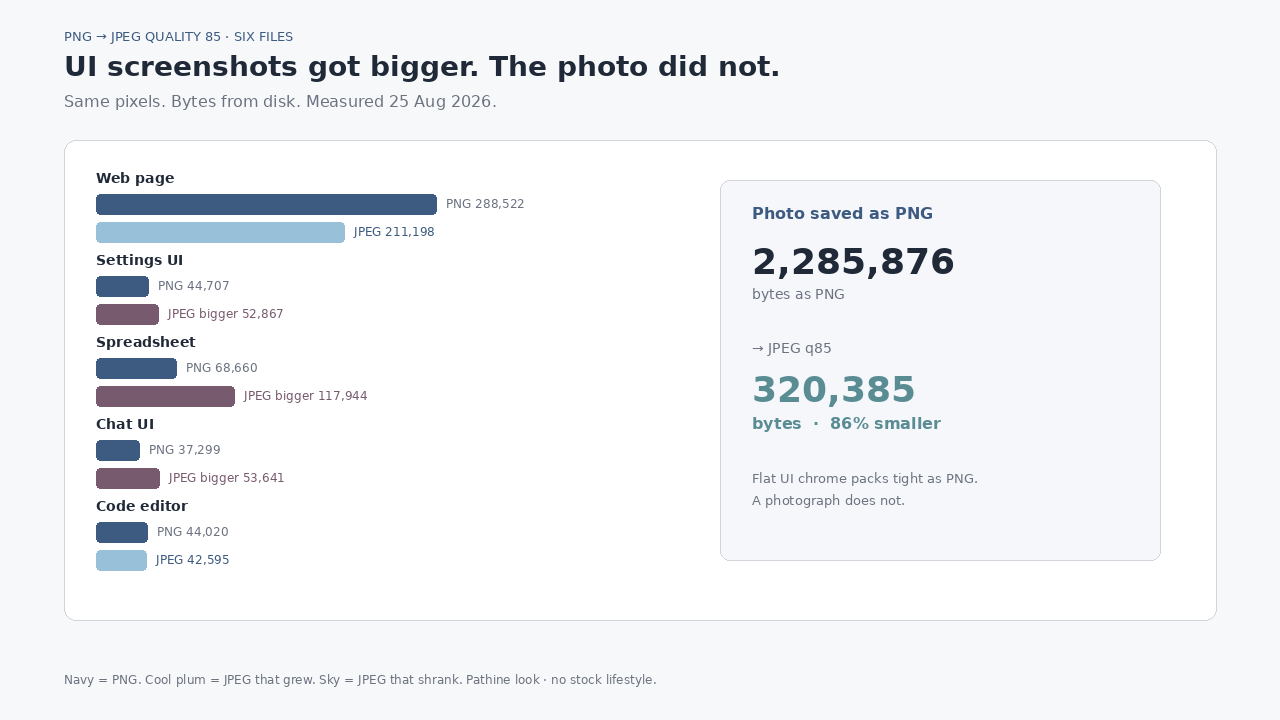
A 1600×1066 photograph saved as PNG was 2,285,876 bytes. The same pixels as JPEG quality 85: 320,385 — 86% smaller. A spreadsheet UI screenshot went the other way: 68,660 bytes as PNG, 117,944 as JPEG quality 85. Converting a screenshot to JPEG is not a free shrink. It depends on what is in the picture.
The advice floats everywhere: “screenshots are PNG, convert them to JPG to save space.” We measured six real files on this computer today. Four of the five interface shots got bigger, or barely moved, at a quality you would actually use. The photograph was the only slam dunk.
What we actually did
Six PNG originals:
- A real Wikipedia article screenshot (captured earlier for another Pathine run): 1178×1464-ish content, 288,522 bytes.
- Four UI screens drawn on this machine — Settings list, spreadsheet grid, chat bubbles, dark code editor — flat color, sharp text, no camera noise.
- One photograph (food) re-saved as PNG at 1600×1066: 2,285,876 bytes. That is the control: photo pixels trapped in a lossless format.
Each file was decoded to RGB and re-encoded with Pillow (libjpeg) at JPEG quality 60, 70, 80, 85, and 92, optimize=True. Bytes are from disk. No invented ratios.
| File | Kind | PNG bytes | JPEG q85 | Change |
|---|---|---|---|---|
| Wikipedia article | Web screenshot | 288,522 | 211,198 | −26.8% |
| Settings UI | Flat UI | 44,707 | 52,867 | +18.3% |
| Spreadsheet | Flat UI | 68,660 | 117,944 | +71.8% |
| Chat UI | Flat UI | 37,299 | 53,641 | +43.8% |
| Code editor | Flat UI | 44,020 | 42,595 | −3.2% |
| Photo as PNG | Photograph | 2,285,876 | 320,385 | −86.0% |
At quality 92 the UI files were worse still: the spreadsheet landed at 140,595 bytes, more than double the PNG. At quality 60 the spreadsheet was still 85,851 — larger than the PNG — and the text would already show JPEG ringing. There was no quality setting that made that grid both smaller and clean.
Why PNG wins on UI chrome
PNG is lossless. Long runs of the same gray in a Settings row, a white chat bubble, a dark editor gutter — those compress. JPEG is built for photographs: smooth gradients, sensor noise, things the eye forgives. Sharp black text on a flat fill is the opposite. The encoder spends bytes fighting edges it was not designed to keep, and you still get halos around letters.
A web-page screenshot sits in the middle. Ours had enough photographic content (images in the article) that JPEG quality 85 saved about 77 KB. Useful if a form demands JPEG. Not a reason to convert every capture by default.
When JPEG is the right move
If the “screenshot” is really a photograph — a phone pic someone exported as PNG, a poster, a product shot — convert it. Our food photo dropped from 2,285,876 to 320,385 bytes at quality 85. That is the same injury Pathine already measured in Why is my PNG so large?: lossless format on camera pixels.
If a portal only accepts .jpg, convert even a UI shot. Prefer a lower quality only after you look at the text. The Pathine PNG to JPG tool runs in the browser; the file is never uploaded. Pair it with eyes on the result, not a blanket habit.
What this does not prove
We did not measure HEIC, WebP, or PNG-8 palettes. We did not measure every phone OS screenshot pipeline — some already write JPEG. Your spreadsheet theme, font, and resolution will move the absolute numbers. The direction should hold: flat UI with text is a poor JPEG customer; a photograph trapped as PNG is an excellent one.
A few straight answers
Should you convert a screenshot to JPEG?
Only if you need the .jpg extension, or the file is mostly a photograph. Four of our five interface shots were larger as JPEG quality 85 than as PNG.
Why is my screenshot PNG already small?
Ours were 37–69 KB for phone-sized UI. PNG likes flat color. The heavy PNG is usually a photo, not a Settings panel.
What about quality 60 to force a shrink?
Our spreadsheet was still bigger than the PNG at quality 60 (85,851 vs 68,660), and the glyphs would soften. Shrinking the pixel grid beats punishing the codec.